Two Fields, One Network: How Point-to-Point Links Wire Your Event Together
An event can look like one site on the map and behave like two. The box office is by the entrance; the main event is across the road. The campsite is beyond the trees. Traders are set up in a separate field. And the production compound needs access to the same systems as the rest of the show.
That’s where a point-to-point link can help. Instead of hoping a single event WiFi network reaches every corner, a dedicated wireless bridge connects two separate locations.
What is a point-to-point link?
A point-to-point link is a direct wireless connection between two fixed locations. A directional radio at one end sends and receives data with a matching radio at the other. Together, they create a bridge between the networks at each site.
Think of it as a cable in the air: devices at the second site can reach the wider event network without running a physical cable all the way between them. The link itself doesn’t create WiFi coverage for guests. It carries the connection between sites, where local access points or wired network equipment can distribute it.
A point-to-point WiFi link can be part of a wider event WiFi and connectivity setup, supporting the systems that need to work across the site.
Why not just stretch the WiFi?
WiFi is designed to serve devices within an area. It isn’t always the best way to join two separate sites, especially when there’s a road, distance, buildings or changing event infrastructure between them.
Trying to stretch one network across a large, irregular footprint can mean weak signal, roaming issues and dead zones. A phone or ticket scanner might hold on to a distant access point rather than connect to a closer one. That’s not ideal when staff are processing arrivals or traders are taking payments.
A dedicated bridge gives the connection between the two locations its own route. When properly designed and installed, it can provide a more predictable link than asking guest-facing WiFi coverage to do two jobs at once.
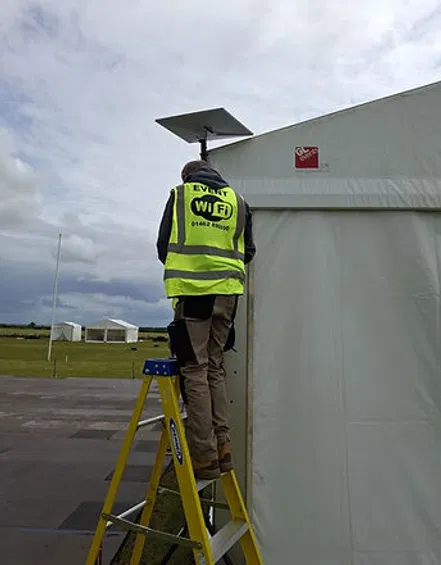
An event connectivity installation in a temporary setting. The exact equipment depends on the network design and site conditions.
Why not install fibre or a leased line?
If a permanent connection already reaches both locations, it may be a good option. But arranging a new physical connection for a temporary event can be a different story.
A fibre installation may involve civil works, permissions, access arrangements and lead times that don’t fit the event schedule. Digging across a field, road or third-party land can be costly and disruptive. A leased line may make sense for a permanent venue, but it can be difficult to justify for a short event or a site that changes from one year to the next.
A wireless bridge avoids the need to run a cable between the two points. It still needs proper planning and installation, but it can be a practical alternative when there’s a suitable radio path and a physical cable is not realistic.
How does the radio link work?
One directional radio is mounted at each end, often on a building or a secure temporary mast. The two radios are aimed at each other and carry network traffic across the gap. Depending on the equipment, the link may use a licence-exempt band under specific rules or a licensed frequency coordinated for the job.
The important thing is that radio conditions matter. A clear line of sight is usually needed between the two ends. And it’s not just about being able to see the far mast: trees, structures or equipment close to the path can also affect the signal. Engineers account for the radio path and the space around it when they survey and position the equipment.
A link that works well on paper can be disrupted by the site as it’s built. Trees in leaf, marquees, cranes, fairground rides, temporary towers or even a new structure since the survey can get in the way. That’s why the survey needs to reflect the real event layout, not just an early site plan.

Where can an event bridge help?
A point-to-point link is useful whenever two parts of an event need to share network services. For example, it could connect:
The entrance and the main event network, so the box office and ticket scanning system can reach the systems they need.
An overflow car park, where staff may need access to event systems or networked equipment.
A campsite or separate field, where a dedicated link can bring connectivity closer to the area that needs it.
A production compound, linking operational systems to the wider event network.
A traders’ village across a road, where payment terminals or other business systems need a reliable connection.
CCTV at a distant perimeter, provided the link has enough capacity for the camera traffic and the network is designed appropriately.
The right setup depends on what needs to connect, how much data it uses and how important it is that it stays available. A few cameras and staff devices have different demands from ticketing, production systems and a busy trading area.
Licensing, reliability and backup
In the UK, don’t assume every point-to-point radio can be switched on anywhere without conditions. Some equipment operates in licence-exempt bands, but it still needs to meet the relevant technical requirements. Other links may need an Ofcom licence or frequency coordination. The rules depend on the equipment and frequency being used.
Ofcom’s point-to-point links guidance and its fixed terrestrial links pages explain the different types of links and licensing routes. A professional survey helps identify an appropriate option for the site and the event.
Reliability comes down to more than headline speed. A well-planned radio bridge can provide a direct, low-latency route between locations, without relying on devices to roam across a stretched WiFi footprint. But performance depends on the path, equipment, interference and installation. It should be checked under realistic conditions, not just assumed from a specification sheet.
For high-stakes systems, think about what happens if the link is interrupted. Depending on the event, a second route or a 4G/5G failover may provide useful backup. The backup should be planned and tested, with the most important systems prioritised. A spare connection that nobody has checked before gates open isn’t much of a safety net.
Plan the connection before the site fills up
Share the site plan early, including roads, buildings, trees, stages and planned structures. Identify what needs to connect at each end, and flag anything that may change between the survey and installation. Those details help the team choose suitable mounting positions, radio equipment and backup options.
A wireless bridge won’t solve every connectivity challenge. But when two parts of a temporary event need a dependable connection, it can be a practical way to bring them together, without trying to make one WiFi network cover everything or laying a new cable across the site.
Planning a multi-site event? Talk to Commsuk about your event connectivity. Call 01462 896800 or email james@commsuk.ltd.
Comments