Production WiFi: The Behind-the-Scenes Network Your Event Can't Run Without
Most people notice event WiFi when it fails.
A guest cannot load the event app. A card machine stops processing payments. An exhibitor loses connection halfway through a demonstration.
Behind the scenes, the consequences can be even bigger.
Production teams rely on connectivity for show control, comms apps, crew tablets, scanners, printers, lighting and sound systems, POS terminals, livestreaming and day-to-day logistics. If those systems are all sharing the same network as thousands of guests, a small spike in public usage can quickly become an operational problem.
That is why serious events need a dedicated production WiFi network.
It is the private, managed connection that keeps the people running the event connected, even when the public network is busy.
What is production WiFi?
Production WiFi is a dedicated network for the technical, operational and logistical teams working at an event.
It can support:
Production offices and crew tablets
Stage management and show-control systems
Lighting and sound control
Radios-over-IP and comms apps
Ticket scanners and access-control devices
Printers and shared production equipment
POS and back-office systems
Livestreaming and media workflows
Security, logistics and site-management teams
Equipment monitoring and remote support
It is not simply a stronger version of guest WiFi.
It is designed around the systems that help the event operate. That means more control, better prioritisation and tighter security.
At a festival, production WiFi may need to cover the stage area, production office, backstage compound, artist village, security control, catering areas and temporary structures. At a corporate event, it might cover the technical desk, green rooms, registration team, breakout rooms and loading areas.
The layout changes. The principle stays the same: production traffic should not be competing with casual browsing and social media uploads.
Production WiFi, staff WiFi and guest WiFi are different
These networks often get treated as if they are interchangeable. They are not.
Guest WiFi
Guest WiFi is built for attendees. Typical uses include:
Browsing the web
Using the event app
Sharing photos and videos
Checking email
Accessing schedules and maps
It may use a captive portal, usage limits or per-device bandwidth controls. It also needs to be isolated from internal event systems.
Staff WiFi
Staff WiFi is for general event employees, contractors and organisers. It may support email, messaging, scheduling tools, ticketing systems and routine administration.
It is more secure than a public guest network, but it does not necessarily need access to production systems.
Production WiFi
Production WiFi is for the devices and people keeping the event running.
It may need:
Higher priority
Lower latency
More predictable performance
Wider coverage in non-public areas
Stronger access controls
Support for specialist equipment
Reliable service during setup, showtime and breakdown
A production manager checking a schedule is not the same as a lighting operator controlling a live show. A crew tablet downloading a document is not the same as a radio-over-IP system carrying time-sensitive communications.
Separating these uses makes the network easier to protect and manage.
Why production needs its own SSID and segmentation
A separate SSID gives the production team a clear, controlled network to connect to. Behind that SSID, the network should be segmented using appropriate VLANs, firewall rules and access policies.
This helps in four important ways.
1. Guest usage cannot take priority over operations
A busy guest network can generate a surprising amount of traffic. Video uploads, app downloads and social media usage can quickly consume available capacity.
Production traffic should have its own bandwidth allocation and priority. Guests can still get a good experience, but their activity should not be able to disrupt show-critical systems.
2. Sensitive equipment stays isolated
Production systems can contain schedules, contact details, access information and technical controls. They should not be visible to random devices connected elsewhere on the network.
Segmentation reduces the risk of users or compromised devices moving between networks. It also makes it easier to apply different authentication and security rules to different teams.
3. Devices can be managed properly
A production network can be configured around the equipment that actually needs to use it.
For example:
Printers may need to communicate with crew laptops
Scanners may need access to ticketing servers
Radios-over-IP may need stable, low-latency traffic
Lighting and sound systems may need controlled access to show-control devices
POS terminals may need an isolated route to payment services
The network can be designed for these requirements instead of treating every device as a standard internet user.
4. Problems are easier to diagnose
When everything shares one SSID, it can be difficult to see where a fault is coming from.
Is the access point overloaded? Is a guest device consuming bandwidth? Is a production system misconfigured? Is there an issue with the internet connection?
With clear segmentation and monitoring, network teams can identify the affected service more quickly and resolve it without disrupting the rest of the event.
What happens when production uses guest WiFi?
It may work during a quiet rehearsal.
That is what makes it dangerous.
A production laptop connects successfully. A few scanners work. The crew assumes everything is fine. Then the gates open, hundreds of people connect and the network becomes congested.
Suddenly:
Crew tablets take too long to load
Scanners disconnect or need repeated retries
Printers queue jobs
Comms apps become unreliable
Remote control systems experience lag
POS and ticketing teams start using mobile data
The production team loses visibility of what is happening
Even if the network does not completely fail, inconsistent performance is enough to cause problems. Production systems need predictable connectivity, not just an acceptable speed test at 9am.
The same applies to phone hotspots.
A hotspot can be useful as a temporary emergency connection for one laptop. It is not a production network. It depends on local mobile coverage, battery power, device limits and whatever congestion exists on the public mobile network.
It also creates management problems. There may be no central monitoring, no coverage planning, no prioritisation and no clear support route when several devices are connected.
For a critical event operation, “it works on my phone” is not a network plan.
Planning production WiFi properly
Good production WiFi starts before the equipment arrives on site.
1. Map the working areas
List every area where the production team will need connectivity, including:
Main stage and side stages
Front-of-house control positions
Backstage and dressing rooms
Production offices
Loading bays
Security and access-control points
Crew catering and welfare areas
Broadcast or media compounds
Storage and logistics zones
Temporary marquees and cabins
The production compound is often overlooked. It may be away from the public areas, surrounded by vehicles, temporary buildings and equipment cases. It still needs reliable coverage.
2. Complete a site survey
A proper site survey looks at more than the venue floor plan.
It should consider building materials, structures, distance between areas, outdoor obstructions, available power, cable routes and likely sources of radio interference. For outdoor events, it should also consider weather protection, mounting points and the practical route between the connectivity source and the access points.
A survey helps identify where access points should be placed and where wired connections may be more suitable.
Critical fixed equipment should use wired connections where practical. WiFi is valuable for mobile crews and devices, but a permanent control desk does not need to rely on wireless if a properly installed cable is available.
3. Identify critical traffic
Not every device needs the same treatment.
Separate ordinary browsing from traffic that supports:
Live communications
Ticket scanning
Payment processing
Show control
Audio and lighting systems
Livestreaming
Operational dashboards
Give critical services appropriate priority and reserve enough capacity for them. This is much more effective than simply buying the biggest internet package and hoping it will cover everything.
4. Design coverage backstage and in the compound
Production teams move around. A network that works at the stage desk but drops out near the loading bay is not complete.
Check coverage in the places where people actually work, not just the main audience areas. Include corridors, service yards, backstage rooms, temporary offices and outdoor paths between compounds.

5. Build in resilience
Production WiFi should sit on a properly managed event connectivity setup with a clear fallback plan.
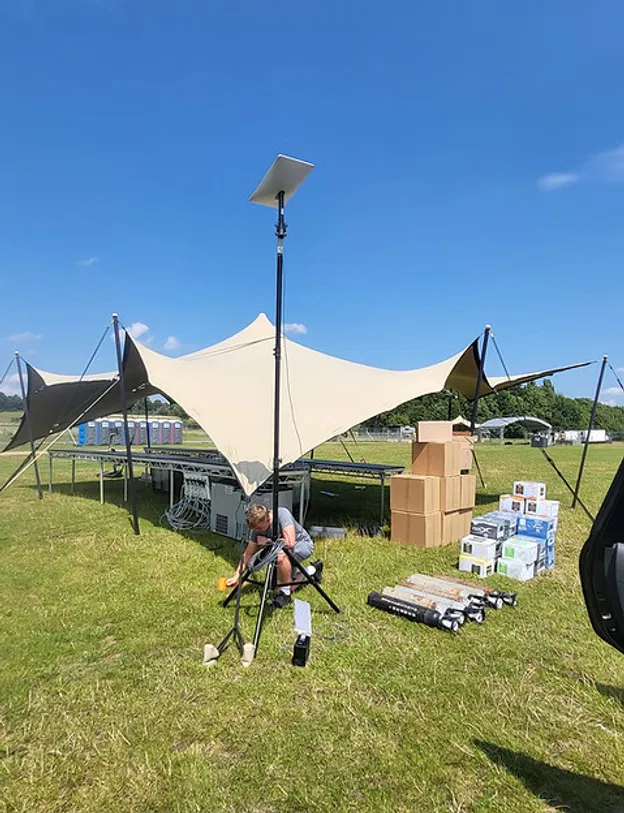
Depending on the location and event requirements, this might include satellite internet, cellular connectivity, fixed-line service or a combination of sources. The important point is that the network should be monitored and configured to protect critical operations if one part of the connection becomes unavailable.
Commsuk can support this process with site surveys, satellite internet installations and fully managed event WiFi, including installation, on-site monitoring and teardown.
A practical production WiFi checklist
Before the event, confirm that you have:
A dedicated production SSID
Clear separation between production, staff, POS and guest traffic
Coverage maps for backstage and operational areas
Access points positioned for real working conditions
Wired connections for suitable fixed equipment
Priority rules for critical applications
Secure credentials shared only with authorised teams
A documented equipment and cable plan
On-site testing before production begins
Live monitoring during the event
A defined support contact for faults
It is also worth asking every production supplier what connectivity their equipment needs. Lighting, sound, video, ticketing and comms suppliers may all have different requirements. Finding that out during the build is much easier than discovering it during doors-open.
The network guests never see
The best production WiFi is invisible.
The scanner works. The printer responds. The lighting operator has control. The production manager can reach the team. The show runs without anyone asking why the internet is slow.
That does not happen by accident.
It comes from separating production traffic from guest and staff usage, surveying the site properly, prioritising the right services and having experienced support available throughout the event.
Whether you are planning a festival, agricultural show, exhibition or corporate production, Commsuk’s event connectivity team can design and manage the network behind the scenes, so your crew can focus on running the event rather than troubleshooting WiFi.
For more on remote connectivity, see the event organiser’s guide to satellite internet and our explanation of why a satellite dish alone is not a complete event WiFi solution.
Comments