The WiFi Goes Up Before the Gates Do: Getting Connectivity Right During the Build
The first network users at an event are rarely guests. They’re the production team, site managers, contractors and suppliers getting the site ready.
That makes the build-up more than a waiting period before the “real” event. It’s when temporary offices take shape, cabins find their positions, power routes become clear and the site starts to change by the hour. These decisions directly affect where connectivity can go and how well it will work.
Good event Wi-Fi planning starts early enough to keep pace with that change. The aim isn’t necessarily to build the entire show-day network on day one. It’s to get the right people and systems connected in each phase, then test and adapt the setup as the site develops.
The network starts with the site plan
Production compounds and site offices often come together before every cabin position, vehicle route or work area is settled. Meanwhile, deliveries are arriving, contractors are moving equipment and site managers are working from plans that may still be changing.
If the event connectivity plan waits until everything is in place, important decisions may already have been made without it. A cabin could end up beyond a reliable cable route. A new structure might obstruct a wireless link. A planned access point might be hidden behind scaffolding or a marquee that wasn’t there during the first survey.
So begin with a conversation about the build, not just a drawing of the finished event. Find out which areas will be active first, where production and site offices are likely to sit, and how those locations could shift. Then review the plan as cabins, structures and work areas are confirmed.
That gives the connectivity team a chance to plan for each stage: an initial connection for the first office, wider coverage as the compound grows, and additional access points or links as the event footprint takes shape.
What needs Wi-Fi before the gates open?
Build-period connectivity supports practical work that can’t always wait for opening day. Depending on the event, the crew may need:
Production office Wi-Fi for laptops, email, shared documents and cloud-based build schedules.
Access to drawings and RF plans as teams review technical details and coordinate changes.
Crew communication tools that rely on internet access. Radios may serve other communication needs, but they don’t replace the network.
Contractor payments for hire equipment, materials or deliveries where card terminals need a connection.
Delivery tracking and coordination so teams can check arrival information and organise unloading.
CCTV monitoring while the site is still empty and equipment or infrastructure is being installed.
These uses aren’t all equal. A production team accessing a shared schedule may have a different need from a contractor making a short payment or a camera sending monitoring data. Thinking through those requirements early helps decide where coverage is needed and which systems should be kept separate.
A dedicated production Wi-Fi network can be especially useful where the production office is the working hub. And where the team needs access to operational systems, it’s worth planning how that access is managed rather than sharing one unrestricted network with everyone on site.

Why build and test the network in phases?
Arriving on setup day to install everything at once can leave too many unknowns to resolve under pressure. During the build, there’s time to check how the network behaves while the site is taking shape.
For example, point-to-point (PTP) links can be tested between the locations they need to connect. If a cabin or compound is moved, the link can be checked again before the event depends on it. Access point positions can also be reviewed while the team can still adjust them. Before marquees, scaffolding, staging or other structures alter the layout.
Cabin placement matters for practical reasons too. A small change in location might make a cable route safer or more workable, or put equipment closer to a suitable power source. It’s far easier to discuss these options while placement is still being agreed than after every unit has been installed and connected. Commsuk’s overview of point-to-point links between temporary event areas explains one way to connect separate locations.
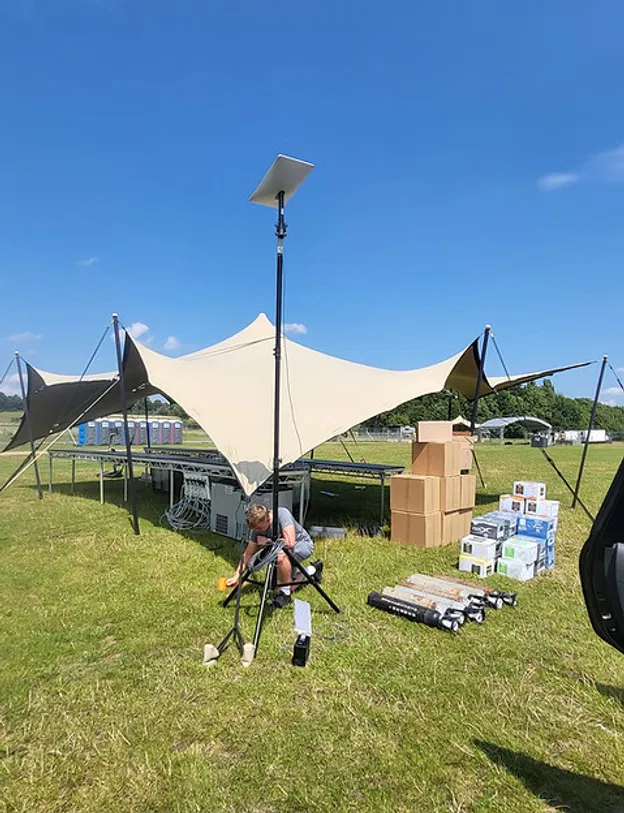
A phased approach also gives the crew a way to report what is and isn’t working. Is the production office covered? Can staff reach the systems they need from the site office? Does a delivery area need a connection for payment or tracking? Those checks help guide the next step in the installation.
Most importantly, network testing can happen alongside the work itself. The team can identify coverage gaps, check links and resolve practical issues before the site fills with equipment, workers and guests. For more on the role of operational connectivity, see Commsuk’s article on staff Wi-Fi.
Build-phase problems to plan for
A build site is not a static office. Routes change, vehicles move and temporary power can be switched off or relocated. A workable plan should account for common disruptions.
Cables can be damaged by diggers, forklifts and other site traffic. Agree safe routes, protect vulnerable cable runs and make sure contractors know where they are.
Radios and other equipment may be moved or borrowed. Keep a record of what is installed where, and agree who can relocate network equipment.
Temporary power may be interrupted. Confirm which power sources serve the network and what the team should do if a cabin or distribution point loses power.
Contractors may use shared Wi-Fi for data-heavy work or video calls. Set clear access arrangements and keep essential production or operational services from being crowded out.
The layout can change after equipment is installed. Recheck affected links and access point locations when cabins, structures or working areas move.
None of this means every change will cause a problem. It means that someone should know what changed, whether it affects connectivity and who can check it.
A practical build-phase checklist
Before and during load-in, organisers can use this short checklist to keep the network plan aligned with the site:
Identify the first locations that need connectivity, including production and site offices.
Share the latest cabin plan, build schedule and known site changes with the connectivity team.
List the systems people need to access, from cloud schedules and drawings to payments and CCTV.
Confirm which areas need Wi-Fi first and where coverage will be added as the site develops.
Agree safe cable routes and confirm the power arrangements for network equipment.
Decide who can move equipment, report a fault or approve a layout change.
Test PTP links and check access point locations as structures go up.
Recheck the network after changes to cabins, structures, power or vehicle routes.
Make sure contractors know how to connect and where to get help.
Get connected while the site is becoming a site
Reliable production Wi-Fi doesn’t have to wait until the crew is nearly finished. Planning connectivity alongside the build gives organisers more time to confirm locations, test links and adapt as the site changes.
Commsuk can carry out site surveys during the build and provide hands-on monitoring from the first cabin through to teardown. That means connectivity is considered as the event takes shape, not left until setup day to discover that the plan and the site don’t match.
If you’re planning a build with working offices, contractors and changing site layouts, contact Commsuk to discuss your event connectivity requirements.
Comments