Staff WiFi: The Unsung Network That Keeps Your Event Running
When people talk about event WiFi, the conversation usually starts with guests.
Will attendees be able to connect? Should there be a captive portal? Can people share photos, check emails and use the event app?
Those are fair questions. But behind the scenes, another network is doing the work that keeps the whole event moving.
That is staff WiFi. And alongside it, production WiFi for the devices and systems your team relies on.
Ticket scanners. Cashless tills. Staff communications. Security systems. Exhibitor support. Back-of-house operations.
If the guest network has a problem, people may grumble. If the staff or production network fails, the event itself can start to slow down.
The network your guests never see
A well-run event can look simple from the outside. Guests arrive, tickets are scanned, payments go through, exhibitors are ready and the programme runs to time.
Underneath that, there is usually a lot happening digitally.
Staff may be using tablets to check registrations, phones to coordinate with colleagues and laptops to manage schedules or supplier information. Security teams may need reliable access to incident reporting tools. Production teams may be moving between stages, control rooms, entrances and temporary offices.
At the same time, ticketing and payment systems need a connection that is stable and properly prioritised.
This is where the difference between general WiFi, staff WiFi and production WiFi matters.
Guest WiFi is for visitors and general internet access.
Staff WiFi is for organisers, crew, suppliers and internal teams.
Production WiFi is for critical operational equipment such as ticket scanners, cashless tills, printers and event technology.
These networks should not all be treated as one shared connection.
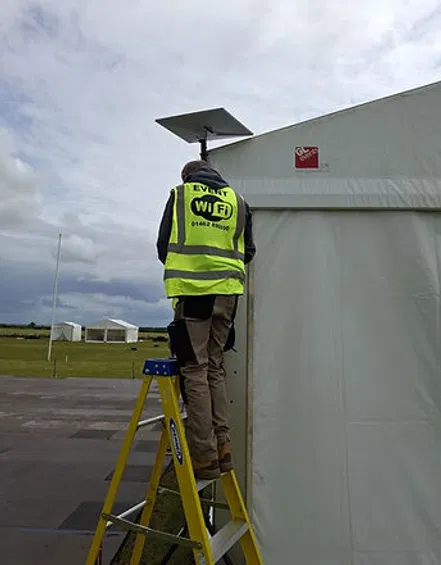
Why a separate staff network matters
Sharing one network across guests, staff and production devices might seem simpler. It can also create avoidable problems.
When hundreds of people connect at once, general browsing, video uploads and social media activity can compete with the systems your team needs most. A busy guest network can place unnecessary pressure on ticketing, payments and staff devices.
A separate setup allows the network to be organised around the event’s priorities.
1. Critical systems get the right priority
Ticket scanners and payment terminals do not need huge amounts of bandwidth. They do need a consistent connection with low interruption.
Production WiFi can be configured around those requirements, giving critical devices priority over less important traffic. That helps scanners stay responsive at the entrance and allows cashless payments to keep moving during busy periods.
For fixed tills and other equipment that does not move, a wired connection may be appropriate. For handheld scanners, roaming staff and mobile production devices, properly planned WiFi gives teams the flexibility they need.
2. Staff traffic is kept away from guest traffic
Staff devices may need access to internal tools, cloud platforms, email or event management systems. Guests may only need internet access.
Keeping the two separate reduces the risk of guest activity affecting staff operations. It also gives organisers more control over who can access different parts of the network.
Production devices can be isolated further, with access limited to the services they actually need. That is a more secure and dependable approach than putting everything on the same shared network.
3. The event team gets a connection designed for real work
Staff WiFi is not just about letting people check messages.
Your team may be uploading documents, accessing schedules, updating registrations, communicating with suppliers or supporting exhibitors. Production teams may need connectivity while moving around a large site, often in conditions that are very different from a normal office.
The network needs to reflect that. Coverage should be planned around entrances, production offices, stages, exhibitor areas, catering points, security posts and other operational locations.
What happens when it fails?
Connectivity problems rarely affect just one person.
A ticket scanner drops offline, so a queue builds at the entrance. A cashless terminal cannot complete a payment, so the queue at a bar gets longer. An exhibitor cannot access their cloud-based demonstration. A member of the production team cannot reach the information they need.
Then people start using personal mobile hotspots as a workaround.
That can create more problems. Mobile coverage may be weak or congested, especially when a large crowd is concentrated in one place. Different teams end up using different connections, making support harder and leaving no clear view of what is happening across the site.
The result is not always a dramatic total outage. More often, it is a series of small delays and interruptions that gradually make the event feel less organised.
That is why staff and production connectivity deserves attention before the event, rather than being treated as something to solve on the day.
Staff WiFi and production WiFi are not quite the same
The terms are often used interchangeably, but the distinction is useful.
Staff WiFi supports people. It is for organisers, crew, suppliers, exhibitors and internal teams using phones, tablets and laptops.
Production WiFi supports the event’s operational technology. It is for ticketing scanners, point-of-sale systems, cashless tills, printers, registration devices and other equipment that needs dependable access to specific services.
In some cases, staff devices and production equipment may share parts of the wider infrastructure. But they should still be planned as separate priorities, with the most critical systems protected from general traffic.
The guest network sits separately again.
This structure means a busy public network does not automatically put pressure on the systems running the event.
Why this matters for autumn events
September and autumn are busy months for events across the UK.
Agricultural shows, trade exhibitions, corporate programmes, festivals and outdoor brand activations are all taking place in venues that may not have the connectivity a modern event requires.
An agricultural show might spread across fields, temporary marquees and exhibitor areas. An exhibition may use a large venue with thick walls, multiple halls and hundreds of stands. A corporate event may need reliable connectivity across registration, breakout rooms, production offices and speaker areas.
In each case, staff and production teams need to keep working even while the public network is busy.
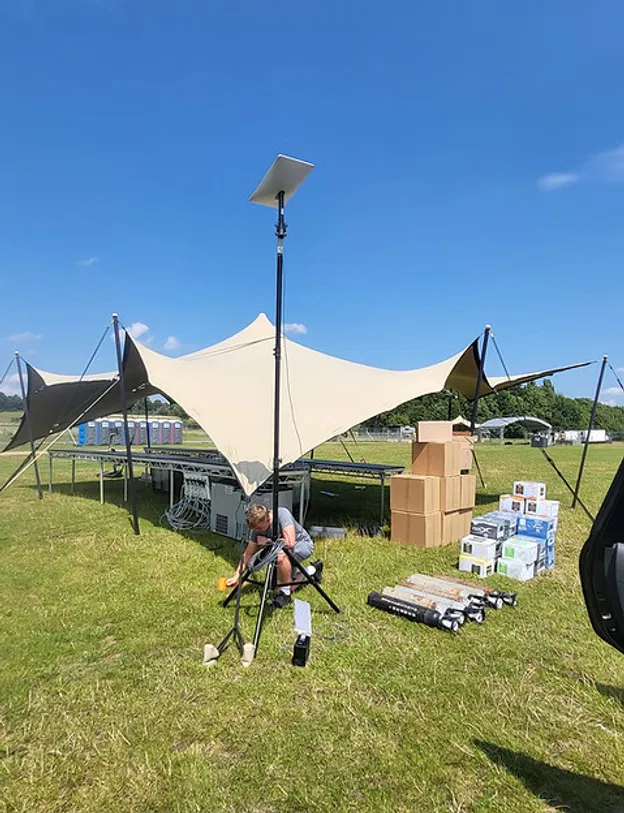
How Commsuk manages the network
At Commsuk, we do not see event connectivity as simply placing a router on site and hoping for the best.
We manage the process from planning through to teardown.
That starts with understanding the event itself:
Where are the entrances and ticketing points?
Which areas need staff WiFi?
Where will cashless tills and production equipment operate?
How many exhibitors, crew and suppliers need access?
What happens if the venue’s existing connection is not enough?
Which systems need priority and which can use general access?
We then plan the equipment, coverage and backhaul around the site. For remote or temporary locations, satellite internet can provide a fast route to reliable connectivity without waiting for fixed infrastructure. You can read more in our guide to satellite internet for remote events.
Where appropriate, we build in backup options such as cellular failover, backup hardware and power protection. The exact setup depends on the event, but the principle is straightforward: critical operations should not rely on one connection or one piece of equipment.
Our team also monitors the network during the event. That means issues can be identified and addressed before they become a bigger disruption for your staff, exhibitors or guests.
This is the same approach we describe in our event WiFi redundancy checklist: plan for problems, monitor the systems and have a practical response ready.
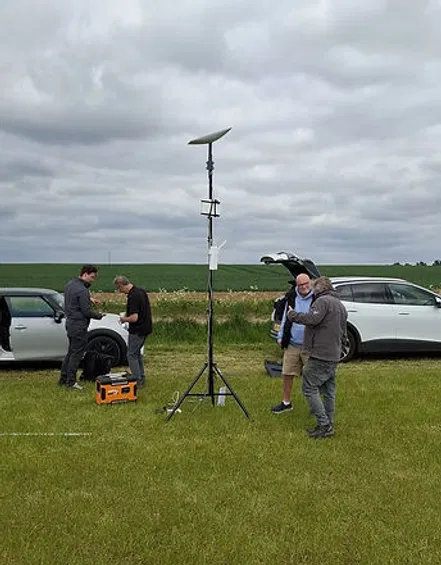
A simple checklist for your next event
When planning connectivity, ask:
The network behind a smooth event
Guest WiFi may be the most visible part of an event’s connectivity. Staff WiFi and production WiFi are often more important.
They keep the scanners scanning, the tills taking payments, the production team communicating and the event moving forward.
With separate networks, sensible prioritisation, proper coverage and built-in backups, your team can focus on running the event instead of troubleshooting the internet.
From autumn agricultural shows and exhibitions to festivals, corporate events and smaller pop-ups, Commsuk provides fully managed event connectivity, including planning, installation, monitoring and teardown.
Talk to Commsuk about your next event and make sure the network your team relies on is ready before the doors open.
Comments