Why Marquees Are Hard on Event WiFi (And How We Fix It)
Marquees are brilliant event spaces. They can appear almost anywhere, scale up for a festival or agricultural show, and create a memorable setting for a wedding, corporate event or Christmas party.
They are also surprisingly difficult places to provide reliable WiFi.
The challenge is not usually the marquee fabric itself. It is everything around it: metal frames, foil-backed linings, temporary walls, lighting rigs, limited cable routes and a high concentration of people and devices in one enclosed space.
A network that works perfectly on an empty field can behave very differently once the marquee is dressed, powered and full of guests.
That is why temporary structures need proper event WiFi planning, rather than a router placed near the entrance and a hope that the signal reaches the rest of the room.
Why marquees interfere with event connectivity
WiFi uses radio signals. Those signals need a clear and predictable route between an access point and the devices using it.
A marquee can make that route anything but predictable.
Metal frames and foil-backed linings
Many marquees use metal poles, frames or trusses. These can reflect, absorb or obstruct radio signals, creating uneven coverage inside the structure.
Foil-backed linings can be even more challenging. The foil layer may reflect or weaken WiFi signals, particularly when an access point is outside the marquee and devices are inside.
The result can be patchy coverage, unexpected dead zones or devices that appear connected but struggle to maintain a useful connection.
It helps to think of the marquee walls less like fabric and more like a set of internal brick walls from a radio signal’s point of view. The materials may look lightweight, but they can still change how the signal travels.
Once you add staging, screens, lighting equipment, exhibition stands and temporary partitions, the radio environment becomes more complex again.
No permanent cable routes
A permanent venue usually has network points, fixed access point locations and established power infrastructure.
A field or temporary hall often has none of these.
Cables may need to run alongside lighting, audio, staging and power distribution. Equipment may need to be mounted on temporary structures, poles or truss. Everything must be safe, tidy and suitable for the event layout.
This is why venue WiFi planning for a marquee needs to happen alongside the wider site plan. Network equipment cannot be designed in isolation from the rest of the build.
A concentrated crowd
A marquee often places hundreds of people in a relatively small area. That makes it a concentrated hotspot for event connectivity.
Every guest may have a phone. Staff may have tablets or handheld devices. Exhibitors may be taking payments. Production teams may be using laptops and communications systems. Ticket scanners, event apps, live streams and cloud-based systems may all be active at the same time.
This is not just a coverage problem. It is a capacity problem.
An access point can show a strong signal while still struggling to serve the number of connected devices competing for airtime. During a quiet setup period, everything may look fine. When everyone arrives, performance can change quickly.

The practical fixes
The good news is that marquees are very workable when the network is designed around the structure rather than added as an afterthought.
1. Plan access point placement around the marquee
Access points should be positioned according to the shape, size and use of the marquee.
For a small structure, one carefully positioned access point may be enough. Larger or more complex layouts may need several access points, each serving a defined area.
We consider:
The position of metal frames and supporting poles
Foil-backed linings and temporary walls
The location of bars, stages, stands and registration desks
Guest seating and high-density areas
Payment points and ticketing stations
Staff-only and production areas
How people will move through the space
The aim is not simply to create the strongest possible signal. It is to provide stable coverage and enough capacity where it matters.
2. Use directional coverage where it helps
Some temporary structures are long, narrow or divided into distinct zones. In these cases, directional coverage can help focus the signal where it is needed.
Rather than broadcasting equally in every direction, a directional setup can serve a particular area more deliberately. This can reduce overspill, improve performance in busy zones and make better use of the available radio spectrum.
The right approach depends on the marquee design. There is no single layout that works for every event.
3. Bring cabling in with the rest of the site services
Network cabling should be planned and installed as part of the wider event build.
That means coordinating with the teams responsible for:
Power distribution
Lighting
Rigging
Audio and video
Staging
Production offices
Exhibitor areas
Security and access control
When cabling is added early, it can be routed safely and discreetly. It also avoids the familiar problem of trying to install WiFi after the marquee has been fully dressed, when access is restricted and every route is already occupied.
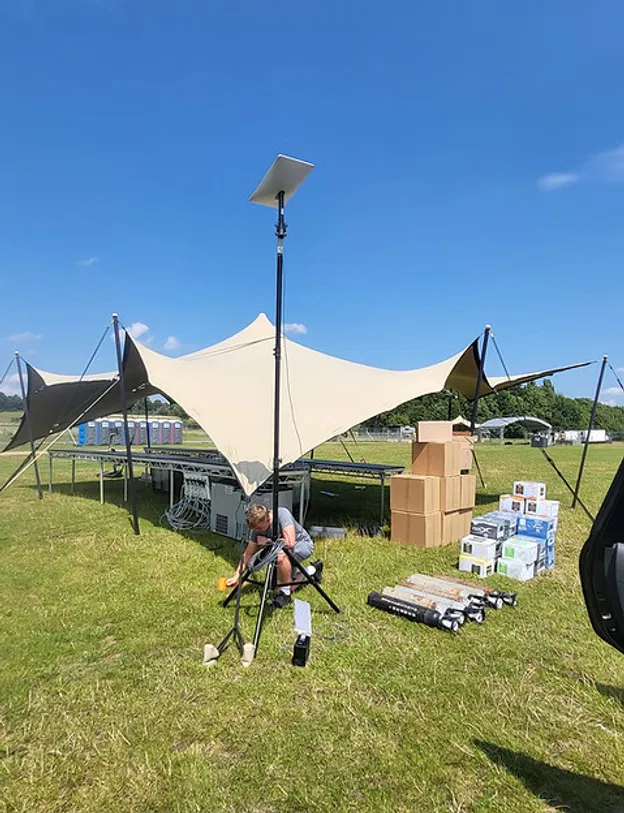
For larger sites, wired links to access points can provide more dependable performance than relying on wireless links between equipment. Where a traditional connection is not available, we can design a suitable temporary backhaul using available site infrastructure or satellite internet.
Our event connectivity service is managed from planning and installation through to live monitoring and teardown.
4. Use the build schedule
Timing matters.
WiFi equipment should go in alongside the lighting and rigging, before the final linings, drapes and decorative elements are installed.
That gives the installation team proper access to the structure and allows equipment to be mounted at the right height. It also means cable routes can be agreed before the marquee becomes difficult to work in.
Installing WiFi after the walls are up often leads to compromises. Access points may be placed too low, too far apart or outside the structure because the best locations are no longer practical.
Temporary does not have to mean improvised. A clear build schedule makes the installation faster, safer and more reliable.
5. Test after the marquee is dressed
This is one of the most important steps in good event Wi-Fi planning.
A network test on an empty field only tells you how the system behaves in an empty field. It does not tell you what happens once the marquee walls, lining, furniture, staging and equipment are in place.
The network should be tested again after the structure is complete and dressed.
That can reveal:
New weak spots caused by internal walls or linings
Reflections around metal frames
Congestion near ticketing or payment areas
Coverage changes caused by staging and AV equipment
Capacity issues in high-density guest areas
Problems with roaming between access points
Where possible, testing should also include representative devices and realistic usage. A phone browsing a webpage is not the same as dozens of payment terminals, ticket scanners, laptops and guest devices operating at the same time.
Our guide to event WiFi load testing explains why an empty venue can give a false sense of confidence.
Seasonal events need extra planning
This matters particularly in the UK from October onwards.
Autumn and winter events often move indoors or under cover. Christmas parties, winter weddings, corporate dinners and seasonal markets may all rely on marquees or temporary halls.
At the same time, wet weather can affect site access, power planning and the installation schedule. Shorter daylight hours can put additional pressure on the build team. Guest arrivals may also be concentrated around a narrow window, creating a sudden demand spike at the entrance.
Wedding season and festival season bring their own challenges. A wedding may need reliable connectivity for guest access, suppliers, music and payment systems. A festival or agricultural show may need coverage across several structures, outdoor spaces and operational areas.
The structure may be temporary, but the services running inside it are often critical.
Why managed event WiFi makes a difference
A managed service looks at the whole event rather than just the internet connection.
At Commsuk, we can help with:
Pre-event planning and site surveys
Access point design for marquees and temporary halls
Network cabling and equipment placement
Satellite internet installation where required
Separate networks for guests, staff, payments and production
On-site monitoring during the event
Backup connectivity for additional resilience
Full removal after the event
Our satellite event WiFi approach is especially useful for rural sites, fields and temporary venues where permanent broadband is unavailable or unsuitable.
The benefit is not just faster setup. It is having someone responsible for how the network performs once the event is live.
If a busy registration desk starts seeing timeouts, device numbers rise unexpectedly or a section of the marquee develops a coverage issue, the problem can be identified and addressed before it affects the wider event.
Reliable WiFi starts before the marquee is finished
Marquees are not difficult because they are temporary. They are difficult because their materials, layout and crowd patterns can change the way a wireless network behaves.
The answer is deliberate planning:
Design around the structure
Place access points inside where appropriate
Use directional coverage for defined areas
Install cabling with the rest of the site services
Build WiFi into the lighting and rigging schedule
Test after the linings and equipment are in place
Monitor the network while the event is running
Keep backup options available
With the right approach, a marquee can support ticketing, payments, guest access, exhibitor systems, staff communications and live event activity without becoming a connectivity headache.
If you are planning a covered event this autumn or winter, talk to the Commsuk team before the build schedule is finalised. A little planning early on can make a significant difference once the doors open.
Comments